A content approval workflow is the route a post takes from the moment you stop drafting it to the moment it is cleared to publish, and a working one spells out who has to look at it, in what order, and by when.
That is the entire definition, and you could sketch yours out in twenty minutes with a coffee.
The reason the one you have right now is not holding has very little to do with the definition, and almost everything to do with the fact that every guide teaching you to build one quietly assumes you have people to hand things to.
What a content approval workflow actually is
Underneath the flowcharts it is three questions, with the answers written down somewhere other than your head.
- Who sees this post before the client does?
- What happens when the client asks for a change?
- What actually counts as a yes?
Most solo social media managers can answer the first one instantly, because the answer is you and there is nobody else in the building.
Then it goes quiet on the other two, not because you have not thought about them, but because the answers sit in a slightly different arrangement for every client, worked out over months of trial and error and held together by your memory of how each one likes to be handled.
- Client A approves by replying "love it!!" to a Canva link.
- Client B leaves comments in a Google Doc and then texts you a fifth change at 10pm.
- Client C has never opened an email in her life, so you screenshot the post into WhatsApp and hope for a thumbs up.
All three of those are technically workflows, and you are running them in parallel while being the only place any of it is written down.
The five stages of a content approval workflow when you are every role
So build the version that fits the business you actually have. Five stages, all of them yours, and the only real requirement is that each one has an edge you can watch a post cross.
- 💡 Idea. It exists as a line of text and nothing has been made yet.
- ✍️ Draft. You are building it, the caption is half written, the visual is not final. This stage is private and it should be structurally impossible for a client to wander into it.
- 🔍 Internal check. You reread the finished post as though a stranger sent it to you, against the brand guide and the month's plan, and you fix the things you already know they will flag.
- 📬 Client review. It is with them, it has a deadline attached, and you are not touching it.
- ✅ Approved. Signed off, dated, and safe to schedule.
Stage three is the one that gets skipped, every time, and it is the cheapest twenty minutes in the whole process.
When you draft something and send it straight over because you have four other clients waiting, you are handing your client a first draft and calling it a review, and then the two rounds of revisions that come back feel like the client being difficult when really you outsourced your own proofread to them.
The stage where a content approval workflow actually breaks
None of the guides get to this part, which is a shame, because it is where your actual weeks go.
Sit down and honestly time a post from first draft to live, then work out how much of that stretch you were doing anything at all.
The post was finished on Tuesday morning. It went live the following Wednesday.
Somewhere in those eight days you spent maybe forty minutes on it, and the rest was waiting, following up, checking whether the email had been opened, and drafting increasingly casual versions of the same question. Nothing was broken in your drafting. Everything was broken in stage four.
And yet stage four is the one nobody optimises, because it does not feel like it belongs to you.
The instinct is to read the delay as a client who does not respect the work, and once in a while that is genuinely what it is, but far more often you have accidentally made approving a post cost them more effort than it is worth. Look at what you are actually asking them to do.
- Find the link, and work out where it went in the first place.
- Remember which tool this particular client's posts live in.
- Scroll past four posts they already approved to reach the new one.
- Work out how to tell you that number two is fine but they are not sure about the third line.
Every one of those steps is a place for them to think "I will do this properly tonight," which is the precise moment your post loses a week.
How to build a content approval system your clients will actually use
The fix is boring and it is mostly agreement rather than software.
A content approval system is only as good as the rules the client agreed to before the first post ever went out, so put these in your onboarding and your contract, and say them out loud on the kickoff call.
- Define what approval means. Approved means it publishes as it stands. Say it plainly, because plenty of clients think they are giving you general encouragement rather than a green light.
- Put a clock on it. Forty eight business hours is the standard and it is fair. What matters far more than the number is naming what happens when the clock runs out, whether the post moves to the next slot or goes live as drafted.
- One consolidated round of feedback. Not a comment on Monday, a text on Tuesday, and a change of mind on Wednesday morning. One round, everything in it, delivered in the same channel every time.
- Name a single approver. When a business owner loops in her partner and her sister for opinions, you are not running an approval process anymore, you are running a committee, and committees do not have deadlines.
- Send in batches. A week of posts arriving together gets reviewed in one sitting. Posts arriving one at a time across five days get treated as five interruptions.
- Stop accepting sign off in channels you cannot search. A thumbs up on a voice note is not a record, and when a post goes live and the client does not remember agreeing to it, you will want more than your own certainty.
Example: "Approved means it publishes exactly as sent. You have two business days to send changes, all in one message, in the portal. If I have not heard from you by then, it goes out as drafted."
That is the whole policy and it will do more for your week than any tool will.
What to look for in social media approval software
Once the agreement exists, the software's only job is to make holding up their end genuinely easy, and to stop you from being the thing that remembers.
Most tools marketed as social media approval software are schedulers that had an approval feature added later, which shows up in exactly the ways you would expect.
- Your client approves without making an account. Any tool that asks a busy salon owner to create a password and remember which app your posts live in has already lost you three days.
- Feedback attaches to the post itself. A comment sitting on the actual caption, visible next to the thing it is about, ends the archaeology of matching "the second one" to a post from nine days ago.
- It chases them, not you. Automatic reminders on a post that has gone quiet are the single feature most likely to give you your evenings back.
- The status maintains itself. If you are updating a spreadsheet column by hand to say something is waiting for approval, the tool is not tracking your workflow, you are.
- A private drafting space clients structurally cannot reach, rather than a tab you have to remember not to share.
- A record of who approved what, and when. It is the most boring feature on this list right up until the week a client swears she never saw a post.
- It should understand that you have several clients. Per-seat agency pricing and workspaces built for account managers are not designed for someone running four clients alone.
Worth being honest about the limits too. Software will not make a client care about their own social media, and it will not rescue a workflow with no agreed deadline in it.
It removes the friction and the follow-up labour, and that is genuinely most of the eight days, but the rules still have to exist first.
How Say Less Office runs the whole workflow for you
Say Less Office is the one I point people to, because it was built specifically for the solo social media manager running several clients with no team and no VA, rather than being an agency platform with the pricing scaled down.
It covers the whole path from idea to approved, and it deliberately stops there, which I will come back to.
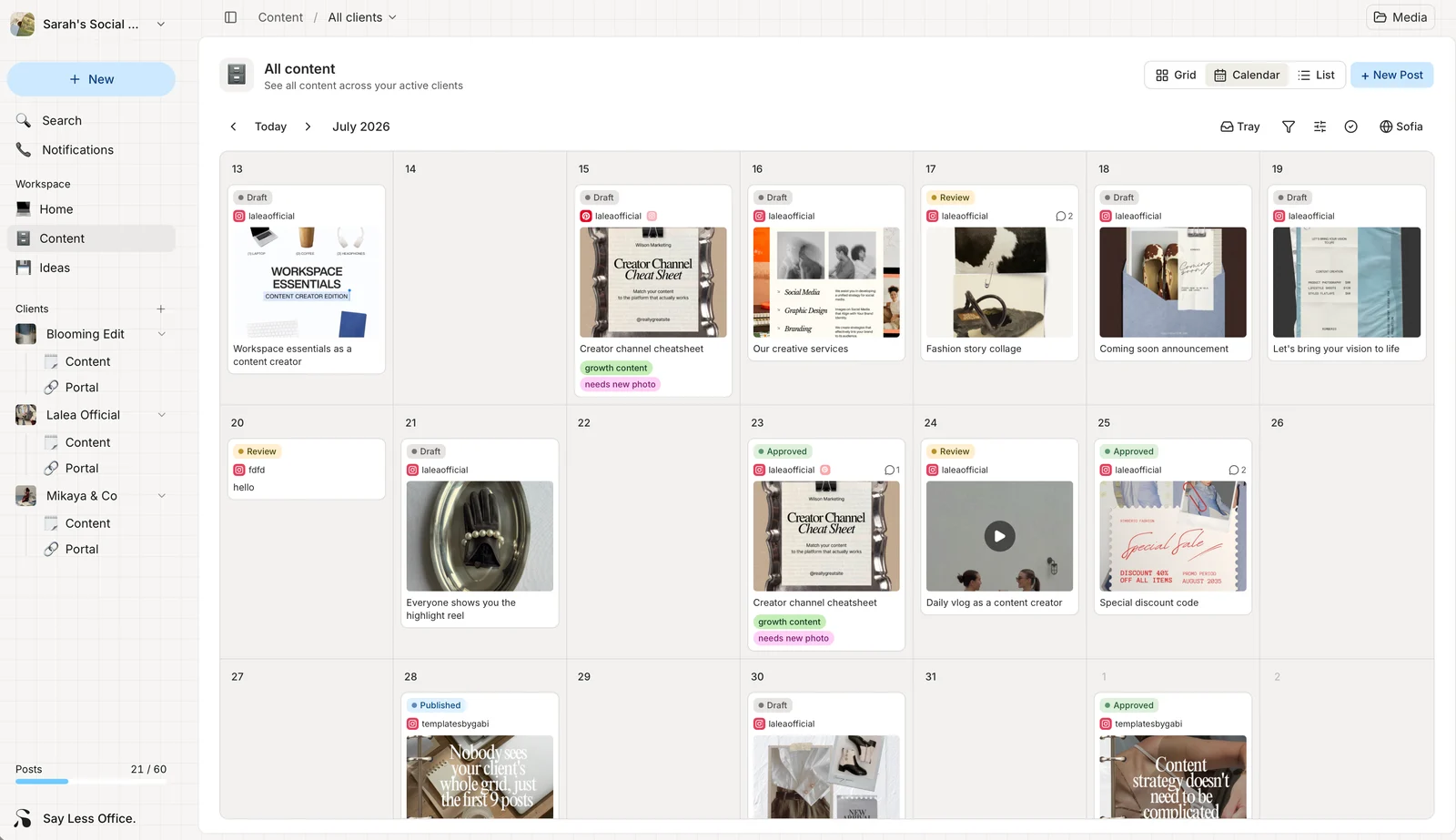
Every client's content sits on one calendar with the status on the face of each post, so the thing you currently reconstruct in your head on Monday morning is just there when you open it.
Draft, review, approved and published are colours you can see across all your clients at once, and the posts waiting on somebody else are obvious without you opening a single tab.
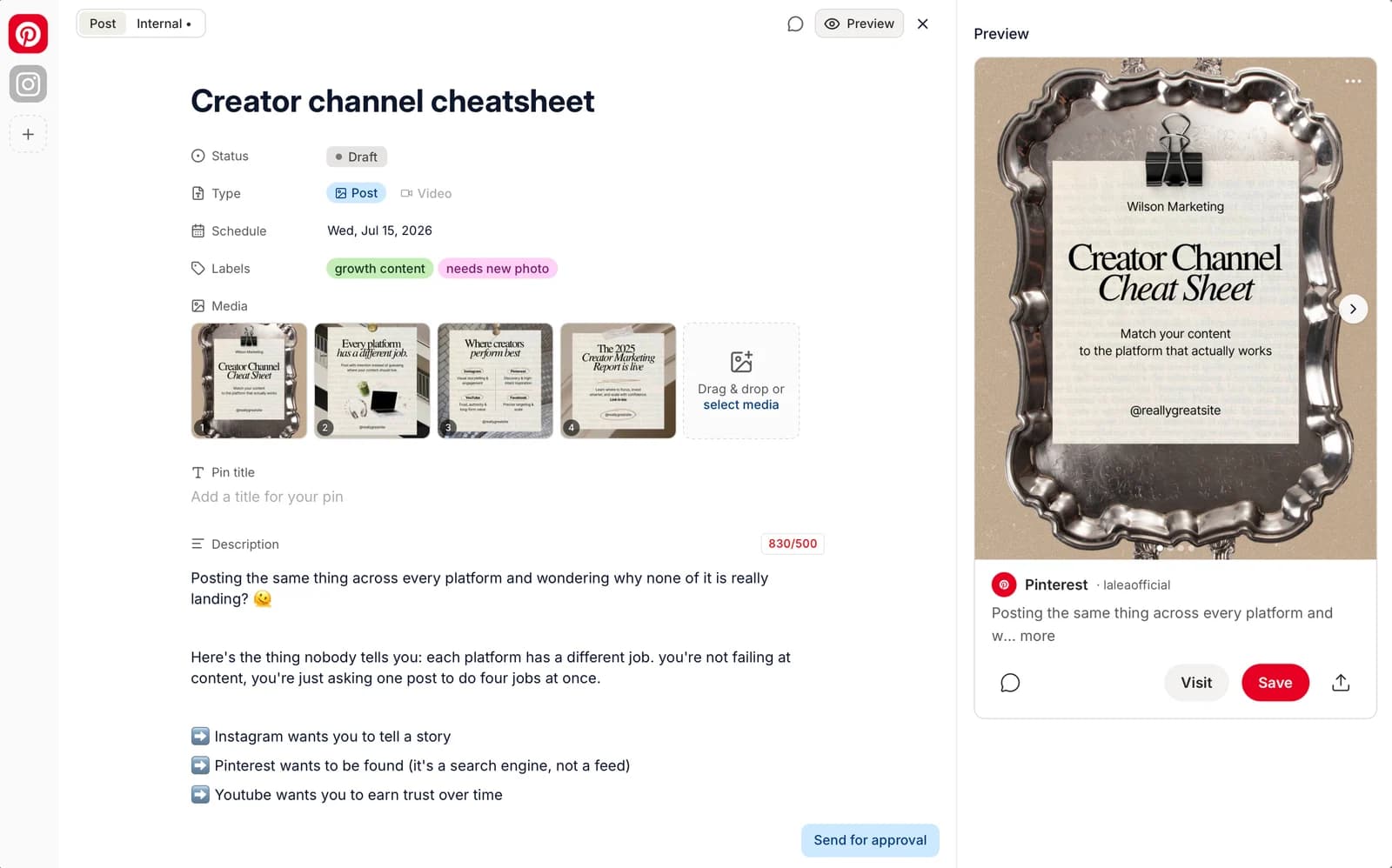
The drafting side does the thing your project management app never could, which is show you the actual post while you write it.
You write the caption with the real preview beside it, the character count for that platform is right there before you find out the hard way, and you can spin up a connected version for each channel instead of rebuilding the same post three times. Your messy notes live in a private internal tab that the client cannot see.
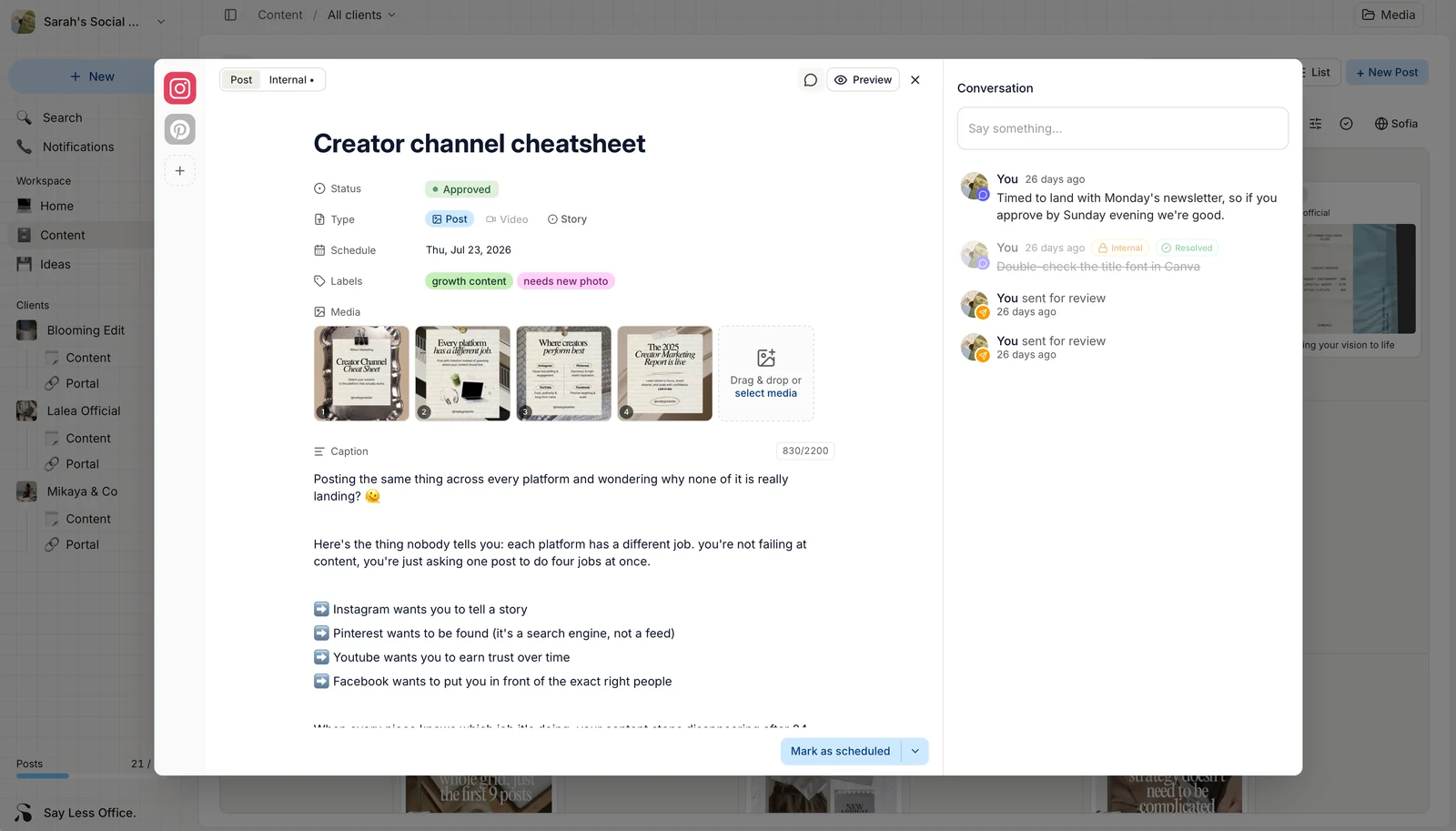
Then the approval part, which is what actually fixes the eight days.
- Your client gets an email, taps through to their own portal, and approves in a click with no signup, no password and no app to install.
- Their comments land on the post itself, next to the caption they are about.
- Your internal notes stay internal and can be marked resolved, so the working conversation and the client conversation are not fighting for the same thread.
- When somebody goes quiet, the app sends the reminder instead of you.
- When a client okays something over DM anyway, you can mark it approved on their behalf, so the status stays honest.
The part to know before you sign up is that it plans and it gets sign off, and then it hands you a finished, approved post to publish wherever you already publish. It is not a scheduler.
If what you want is a posting tool with approvals bolted onto the side, this is not that, and honestly the whole point is that the bolted-on version is what has been failing you.
It is $5 per client per month billed yearly, or $6 monthly, and the first 60 posts are free with no time limit and no card, which is enough to run a full month for a couple of clients and see whether the chasing actually stops.
How to tell whether your approval workflow is working
Track three numbers for a month, and none of them require a dashboard.
- The days between sending a post for review and getting a yes. That number is your real approval workflow, whatever your process document says, and watching it drop from six days to one is the most satisfying thing about fixing any of this.
- How many rounds of revision a post averages. Two is normal, and if you are consistently at three or four, the problem is upstream in stage three rather than with the client being fussy.
- How many approvals happened somewhere you cannot go back and find. Every voice note yes and every "yeah go for it" in a DM is a post you published on trust, and the number being higher than zero is the clearest sign that approving inside your system is still harder for them than messaging you.
What none of this does is make you more disciplined, and that is sort of the point, because discipline was never the thing you were short of.
It moves the remembering out of your head and into something that keeps doing it whether you are having a good week or not, and that is the whole difference between running four clients and running four clients while quietly wondering whether you would survive a fifth.